Sunday, March 28, 2021

CREDITS

CREDITS! YUH! they have been added to the film opening😌

I had so much fun designing the title card for my production company. For starters, the name "LIZEMA" is a mix of Elizabeth Olsen & Emma Stone because they are my biggest Hollywood role models. I wanted the font to radiate a 70s vibe (ironic because the movie is set in the 50s), but I love the 70s. I also replaced the "O"s in "Production" with peace signs so that it would have more of that 70s feel. Overall, I wanted this title card to radiate some aspects of my personality/people that inspire me.

I decided to utilize different fonts for the title and the names. The font for the title is Onyx from Premier Pro and the font for the name is HucklebuckJF from Premier Pro. These fonts can also be seen in the other credits shown below.

I put Mrs. Lutwin's name first since she's the protagonist.


After introducing my actors, I introduced the composer of Lover's Fantasy, Alejandro Rodriguez.

In the last edit I included my name under the title "Written, Produced, Edited, and Directed by".


Friday, March 26, 2021

God Bless Youtube Tutorials

I just finished binge-watching a bunch of Adobe Premier Pro Youtube tutorials and boy, were they helpful!

How to Create a Vignette in Premier Pro: https://www.youtube.com/watch?v=B_n-kr1Z3hk
    I found this tutorial as I searched for help in editing an Iris Shot. I want to use this type of shot at the end when Geraldine winks at Annette. This video was very helpful and it helped me create the circle shape  that I needed. Nonetheless, it does not specify how to animate the vignette so that it becomes the circle, so I had to search for other videos.

Adobe Premier Pro Tip 5 "Iris Rond" NL: https://youtu.be/x1ZXkXCmb8o
    This tutorial was very helpful because it showed how to create the circle and animate the vignette, however, since the narrator isn't speaking in English, I coudn't really understand what they were explaining, I tried to do it by watching him, but I got lost. Nevertheless, this tutorial is great!

Soft Iris (Vignette) Effect for Tone Poem Task...: https://www.youtube.com/watch?v=kd0rhvgZkLk&t=288s
    THIS TUTORIAL!!!!!!!! MY FAVORITE!!! I absolutely love this video and I love how the narrator took his time in explaining how to create an Iris Shot. Not only did I learn how to create the circle and animate the vignette, but I also learned to feather the circle, so that it wouldn't look too strict. I truly enjoyed learning from this tutorial.

YUHHH celebration nationnnnnn


Now that my Iris Shot has been created, I started watching tutorials on how to create a transition from color to black and white and vice versa.

Premier Pro CC: How to do Black and White to Color Transition Effect: https://www.youtube.com/watch?v=WKfhDhJwCPg
    Okay, these tutorials are so amazing. Not only do they get to the point, buttt they get to the point in a MINUTE (yay! I dislike long, boring tutorials). After these tutorials, I was easily able to create that color transition in my film. I'm still playing around with it because I want to try different options before solidifying it, but I'm glad I learned new things.

The computer quality makes it look so grainy😭but I promise the color transition is smooth.

Alright, that's it from me, HASTA LA VISTA!- go eat pineapple and watch La La Land :)

Wednesday, March 24, 2021

The Beginning of Editing

 Now that filming is done, editing time has started. I usually edit my videos on iMovie and then edit the sound on WeVideo. However, I really want to challenge myself by editing through a new software. During a group discussion on our projects, one of my classmates recommended that I use DaVinci Resolve or Adobe Premier Pro. I have never used any of these softwares, but I'm definitely interested in learning how to utilize them. I decided to try out DaVinci Resolve and while it downloaded, I drove all the way to Disney World and back....jk... but it really did take forever to download. When it finally downloaded, it didn't work- yeah, bye DaVinci Resolve. After I got over my melancholic, yet short heartbreak with DaVinci Resolve, I decided to use Adobe Premier Pro. This software took about an hour and a half to download (UGH), but it works splendidly😌. As a newbie to Premier Pro, I felt scared to try this new platform out, but I was also excited. 


Day #1 of Editing (03/22):

I imported all of my video clips into Premier Pro and ordered them on the timeline. I then adjusted the lengths of some of the clips so that the overall video would not surpass 2 minutes. After 2 hours of playing around with my new toy, I called it a day.

Day #2 of Editing (03/23):

On the second day (well, more like night because I started at 11:30pm) of editing, I assembled my videos in a different order than I had the night before because I thought that the new order contributed in advancing the plot of the film. I also started researching "how to" tutorials of Adobe Premier Pro because I'm such a grandma when it comes to using this high tech, video software (another blog post is up which talks about every tutorial I have watched thus far).

Day #3 of Editing (03/24):

I'm editing in a hotel in Savannah, GA. Although I'm on vacation, I toured SCAD today and got so inspired by their film & television department, that I rushed to the hotel after the tour ended and continued to edit my project. I'm focusing on finding music for the opening and the end of the film. My teacher suggested for us to look at an awesome website (chosic.com) to find free music. I went under the "Old" music category and found a couple of options to choose from, but I haven't decided on the two that I will use.

Well, this is all of the editing updates I have for you at the moment,,,

HASTA LA VISTA!- go eat pineapple and watch La La Land :)


Wednesday, March 17, 2021

FILMING DAY!!!

Today has been the busiest day ever. For starters, we filmed my school's musical, 9 to 5, today and boy was that exhausting. After we finished filming, it was time to film my film project. Since my actors and tech crew are all theater with me, they were also exhausted. I felt bad making them film my project on the same day as we filmed the musical, but today was the only day we could film at Lucille's.


Last night, I organized every single prop and costume accessorry into two boxes. I was missing some props like the spray bottle and a white mug, so I drove to Dollar Store to buy them and other missing props. When I finally collected all of my props, I packed up the prop boxes and the tripods in my car. 


We finished filming the musical at 5:00pm and then I went to Publix to get some Pub Subs for my actors. We then ate at the dressing rooms and bonded . 6:30PM came around and we each went home to shower and came back to school at 7:30pm so that they could do their hair and makeup. 

the coolest people ever 


We also had to do Mrs. Lutwin's hair and makeup and it was so funny seeing her wear tons of makeup when she hardly uses any. Ashley curled Mrs. Lutwin's hair and did her makeup with the help of Clementina. They added some blue eye shadow and highlight so that her makeup would match her dress. I was helping Bella get ready. We did not straighten or curl her hair, she actually ended up using the wig that I used for the musical since it had a 1950s style (I PROMISE WE DO NOT HAVE LICE). Clementina used the wig that she used for the musical for my film and it looked awesome with her costume. Additionally, Roy did not have to do much to his hair, lucky him.

Doing Mrs. Lutwin's makeup


We ended up leaving school around 8:40pm which was a little late because we were supposed to be at Lucille's at 8:45pm. When we arrived, we came across a pretty big problem... my manager (who was also supposed to be my actor) was leaving and before I could stop him, he was gone, so I went to my other manager and she said she would stay while we filmed (thanks girl!). Since my other manager was gone, I had to cut his part and dialogue out. 

By 10:30, we finished filming and started packing up. It was an exhausting day, but it was so much fun, I'm so glad I chose this group of people to do this with. I made my cast "thank you" cards because words can't explain how thankful I am for their help. 

Here are some pictures of the shoot:


DREAM TEAMM!!! omg I was so tired look at my eyes


HASTA LA VISTA!- go eat pineapple and watch La La Land :)


Tuesday, March 16, 2021

Da Bible

ALL HAIL DA HOLY BIBLE! She is beauty, she is grace.

 With filming being tomorrow, I started a Google Document which will be my film opening bible since it will contain everything that I will need to make a film opening. I will also be providing my actors and crew with this bible so that they are completely informed. My bible is 18 pages long and contains everything from props to schedules to character descriptions and more! It took me about 6 hours to create her since there is so much information that I had to include. Since there are so many pages, I'm going to upload a video of me scrolling through them, but I will also attach a link to the full document. I hope you enjoy!


Link: https://docs.google.com/document/d/1jrfWSMy1ZnSYpRH_Xx24sklGPhCXMTgZUlzGl0KbweE/edit?usp=sharing


HASTA LA VISTA!- go eat pineapple and watch La La Land :)

Monday, March 15, 2021

Newbies

Welcome to da project, Clem, Ashley, Katie, and Laura! 

As I was doing some brainstorming, I realized that I hadn't cast anyone as The Server yet. Additionally, I realized that I would need to use some help backstage, so I called a few of my friends to see if they were down to help me!


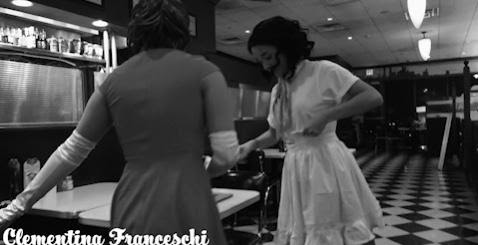
Clementina Franceschi as The Server

Clementina has been doing theater for a really long time now and I'm so stocked she's playing this role! Some of her previous roles include "Judy" in 9 to 5, "Sherri" in Rock of Ages, and "Gabriella" in High School Musical the Musical.


My Tech Crew!!!!

This all-woman-power tech crew will be in charge of helping me set up the set, lighting, speaker, platform stage, and tables. Likewise, they'll also be responsible for changing the set to the "fantasy set" and turning the spotlights on and off for when the fantasy moment starts and ends.
 
Ashley Valent

Ashley Valent has experience working backstage for theater plays/shows. She's stage managed War At Home, Swagger, and Aladdin JR.


Katie Kanefsky

Katie Kanefsky has experience using her dad's high-tech video camera. She help record my school's musicals: Aladdin JR. and 9 to 5.

Laura Mariné


Laura Mariné has not had much experience with tech crew stuff, but I'm glad that this project will help her learn new stuff!

HASTA LA VISTA!- go eat pineapple and watch La La Land :)

Sunday, March 14, 2021

SCRIPT!

 The script is done!!! Oh yeahhh! 

She might seem short since she's only 2 pages long, but the overall film opening will not be as short since the dance take up about 75% of the 2 minute max limit.

update: the image of the script is so hard to read, but if you click on each image, it should look clearer!

HASTA LA VISTA!- go eat pineapple and watch La La Land :)


Melancholic Farewell & CCR

It's currently 3:26am I just finished editing my CCR Well world, here she is. My second baby. CCR-Cupid's Advocate (link just in cas...